



Running Python
Share to




To run Python, there are many ways you can do it. You can use a shell, terminal or use an IDE (Integrated Development Environment). Below are the steps to run Python in the easiest way.
Note: You can also run and edit Python code directly on this website in every code snippet interactively! Look for the "Run" button on the code blocks.
Linux
- Open terminal CTRL+ALT+T
- Type python then you will enter the Python shell.
- Write your Python script, example:
print("Welcome to Python"). If done press the ENTER key, and the Python script will be executed. - To exit from Python shell type
exit()
or
- Use a text editor, for example gedit.
- Create a new file, and type your python script, example:
print("Welcome to Python"). - Save As with extension
.py(example:print.py). - Run file using Terminal.
- Open terminal CTRL+ALT+T.
- Enter the directory where your Python file is saved (example:
cd /Users/admin/Desktop/). - Run the Python script using python followed by the filename (example:
python print.py). - Your Python script will be executed/run.
Windows
Using Shell
- Open IDLE (python shell in windows), you can search for it in the START button.
- Write your Python script, example:
print("Welcome to Python"). If done press the ENTER key, and the Python script will be executed.
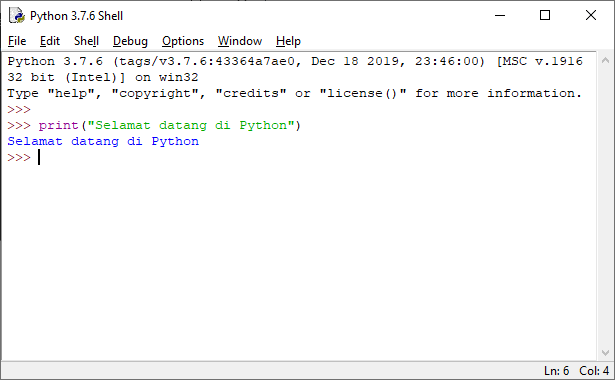
- To exit from Python shell type
exit()
Using Script Editor
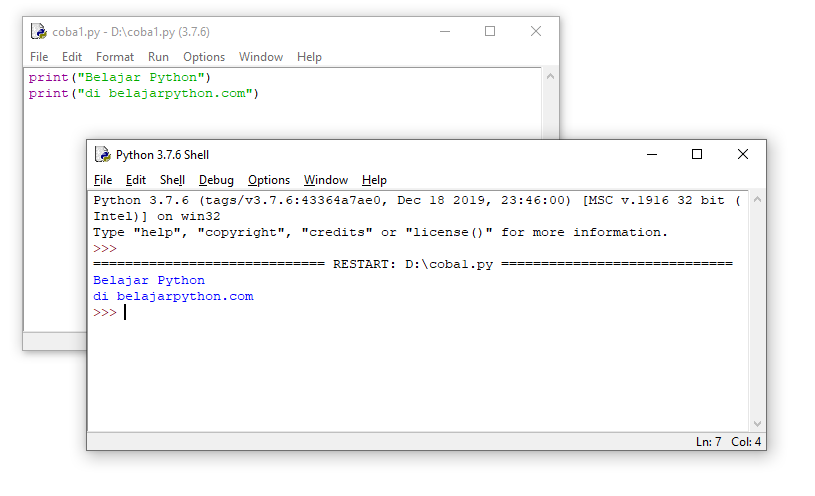
- To run a script saved in a file, open IDLE (python shell in windows), you can search for it in the START button.
- Click menu
File - New File - Write Python script on the window that appears, example:
print("Learn Python")
print("at belajarpython.com")
- Save script via menu
File - Save - Run program by clicking menu
Run - Run Module
Mac OS
- Open terminal.
- Type python then you will enter the Python shell.
- Write your Python script, example:
print("Welcome to Python"). If done press the ENTER key, and the Python script will be executed. - To exit from Python shell type
exit()
or
- Use a text editor.
- Create a new file, and type your python script, example:
print("Welcome to Python"). - Save As with extension
.py(example:print.py). - Run file using Terminal.
- Open terminal CTRL+ALT+T
- Enter the directory where your Python file is saved (example:
cd /Users/admin/Desktop/). - Run the Python script using python followed by the filename (example:
python print.py). - Your Python script will be executed/run.

MICRODRAMA INDONESIA
Nonton & Buat Short Drama AI Gratis
Platform Microdrama AI pertama di Indonesia. Nonton short drama gratis atau buat drama pendek sendiri dengan AI dalam hitungan menit, tanpa kru & kamera.
Coba Gratis Sekarang
100% Gratis untuk dicoba. Bagian dari ekosistem MicroDrama Indonesia.