



Working with JSON Data in Python




JSON (JavaScript Object Notation) is a popular format used for storing and transporting data. In the programming world, JSON is often used when you are fetching data from the internet (APIs) or when applications exchange information with each other.
For beginners, imagine JSON as a "shopping list" that is very neat and readable by both humans and computers. Because its form is similar to Dictionary in Python, learning JSON will feel familiar and very useful when you start building applications that connect to web services or save application configurations.
Below is the structure and short explanation about JSON object:
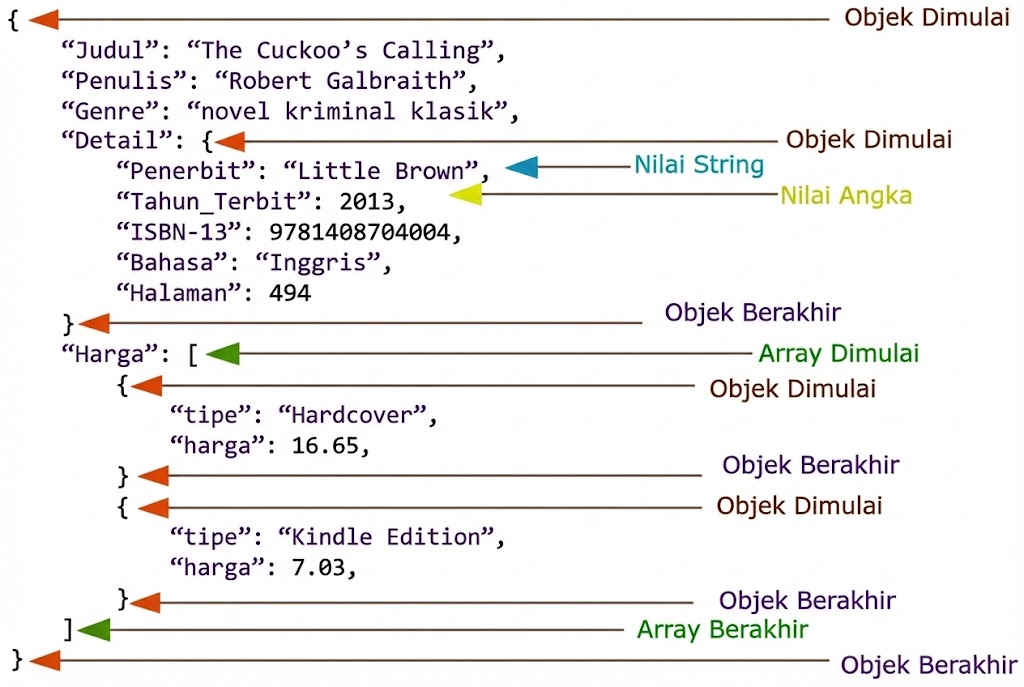
Python has a built-in package called json, which can be used to work with JSON data.
Importing JSON Module
To use JSON in Python, you must import the json module:
import json
Parse JSON - Convert from JSON to Python
If you have a JSON string, you can parse it by using the json.loads() method. The result will be a Python dictionary.
import json

# some JSON:
x =  '{ "name":"John", "age":30, "city":"New York"}'

# parse x:
y = json.loads(x)

# the result is a Python dictionary:
print(y["age"])
Convert from Python to JSON
If you have a Python object, you can convert it into a JSON string by using the json.dumps() method.
import json

# a Python object (dict):
x = {
  "name": "John",
  "age": 30,
  "city": "New York"
}

# convert into JSON:
y = json.dumps(x)

# the result is a JSON string:
print(y)
You can convert Python objects of the following types, into JSON strings:
- dict
- list
- tuple
- string
- int
- float
- True
- False
- None
Format the Result
The example above prints a JSON string, but it is not very easy to read, with no indentations and line breaks.
The json.dumps() method has parameters to make it easier to read the result:
import json

x = {
  "name": "John",
  "age": 30,
  "married": True,
  "children": ("Ann","Billy"),
  "pets": None,
  "cars": [
    {"model": "BMW 230", "mpg": 27.5},
    {"model": "Ford Edge", "mpg": 24.1}
  ]
}

# use four indents to make it easier to read the result:
print(json.dumps(x, indent=4))
You can also define the separators, default is (", ", ": "), which means using a comma and a space to separate each object, and a colon and a space to separate key and value:
import json

x = {
  "name": "John",
  "age": 30,
  "married": True,
  "children": ("Ann","Billy"),
  "pets": None,
  "cars": [
    {"model": "BMW 230", "mpg": 27.5},
    {"model": "Ford Edge", "mpg": 24.1}
  ]
}

# use . and a space to separate objects, and an = and a space to separate keys from their values:
print(json.dumps(x, indent=4, sort_keys=True))
JSON is very frequently used when you fetch data from the internet (API) or when applications exchange information. So, it is important to understand how to work with JSON in Python.

Nonton & Buat Short Drama AI Gratis
Platform Microdrama AI pertama di Indonesia. Nonton short drama gratis atau buat drama pendek sendiri dengan AI dalam hitungan menit, tanpa kru & kamera.
100% Gratis untuk dicoba. Bagian dari ekosistem MicroDrama Indonesia.